Showing posts with label Software. Show all posts

Internet Download Manager Review: Features, Supports, Where To Get, How To Install

Internet Download Manager Review: Features, Supports, Where To Get, How To Install

Posted by Superheatsink  |  at  8:08 PM

Internet Download Manager also known for IDM by Tonic Inc. This software is awesome, using this software save me a lot of time and 100% guarantee in what I am downloading. As a Computer Technician this is a "must have" application because this tool increase download speed for up to 5x faster than a normal downloading.


  • Key Features

1. Automatic downloading of any file type on the internet.
2. Divides downloads into multiple streams for faster downloading.
3. Resume downloads. It can resume and recover the file that you are downloading if download is interupt.
4. Schedule multiple downloads in Que.
5. Organize download location.
6. Best tool for downloading from streaming video sites.

  • Operating System and Browser Support

Operating System:  Microsoft Windows operating system (Xp, Vista, 7, 8)
Web Browsers:  Internet Explorer, Opera, Apple Safari, Google Chrome, Mozilla Firefox. That's the only browser that I've tested but I think this tool will also works in other browsers.

  • Where to get Internet Download Manager

You can get the latest version of this tool in their official website (http://www.internetdownloadmanager.com). You can try this for free in 30 days trial version but if you want it you can buy it for only $29.95 using credit card or Paypal as a payment method.

  • How to install

1. Get free or buy Internet Download Manager installer here www.internetdownloadmanager.com.
2. Run installer. Double click the IDM installer to run.
3. IDM installer wizard will appear. Click Next.
4. License agreement will appear. Click Next.
5. Choose a location for installation then click next.
6. Select a program manager group (do nothing). click Next.
7. Click next to start the installation of Internet Download Manager.
8. The program is now installing wait for a seconds.
9. Installation is complete click finish.
10. IDM extension will integrate to your browser restart your browser to apply changes.
11. Run IDM from your start menu.
12. Enter your registration details (First name, Last name, email and the serial number.
13. You can now enjoy using Internet Download Manager.

Tip: Visit official website to get the latest version and pricing of the software. For more information a leave comment below.

How Important To Have USB Disk Security In Our System

How Important To Have USB Disk Security In Our System

Posted by Superheatsink  |  at  8:05 PM

How really important to have a USB Disk Security in our system? How this kind of software can help us to maintain our PC performance?. I would like to share my experience on how important to have USB Disk Security in our system. 

USB storage is the No. 1 common source of viruses who infect our computer system. Maybe everyone will agree that antivirus software is not enough to protect our system specially in any threats coming for external storage like USB. Viruses that came from external devices is different, they automatically run at the very moment you inserted the device, maybe that's the reason why antivirus software can't detect those threats.

USB Disk Security is the best software that protects your computer in any threats coming form external storage. It perform auto-scan and delete virus automatically at the moment you inserted a flash drive or any external devices when threats detected. USB Disk Security is running perfectly even in offline computers, unlike in any antivirus software it does not require virus definition updates to work properly. I've been using this software for almost 3 years in an internet cafe and laboratories and it gives me a good result to the computers that I maintained. For me it is very important to have USB Disk Security in our system.

ZBshareware released USB Disk Security 6.3 for windows. This latest version of USB Disk Security is free and available on their official website (http://www.zbshareware.com). USB Disk Security 6.3.0.0 works in all windows operating system and there is no conflicts on any antivirus software installed in your system.

How To Install USB Disk Security 6.3.0.0

How To Install USB Disk Security 6.3.0.0

Posted by Superheatsink  |  at  2:01 AM

Recently I posted a review about USB Disk Security 6.3.0.0 for windows by ZBshareware. As an additional review for that specific software here is an instruction on how to install USB Disk Security. First, you need to download USB disk security installer on their official website (http://www.zbshareware.com). After downloading the installer follow this following steps.

1. Run USB Disk Security Installer
2. Select Installation language. Click OK.


3. Select Your Destination Location. Then Click Next.
4. Safe Web Navigation Option. This is optional you can unchecked the box if you don't want to make Linkzb.com as your browser's start page. Click Next.
 5. Select Additional Tasks then click next.
 6. Setup is now ready to begin installing USB Disk Security on your computer. To begin click install.
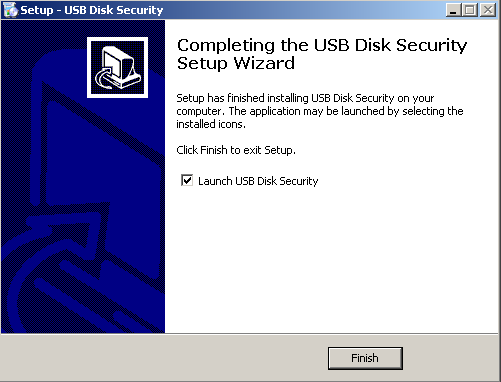
 7. Completing the USB Disk Security Setup Wizard Click Finish.
8. Your Computer is Protected.


USB Disk Security 6.3.0.0 is a free software and there is no conflicts with all antivirus software. This is compatible in all windows operating system even in windows 8. Install USB Disk Security to prevent any threats coming from USB storage and protect your computer from getting slow and malfunction cause by viruses.

USB Disk Security 6.3 Full Features

USB Disk Security 6.3 Full Features

Posted by Superheatsink  |  at  12:19 AM

USB Disk Security, I've been using this software for almost 3 years in Personal computer, Business and offline computers and this really help me a lot in maintaining my clients computers. Zbshareware the developer of USB Disk Security released USB Disk Security 6.3 for windows operating system for free. This software is very helpful to protect your computer from any threats coming from USB storage.

USB Disk Security 6.3 Full Features:
  • 100% Protection againts any threat coming from USB storage.
  • USB Disk Security is a Free Software.
  • Never Slow Down your Computer.
  • Compatible with all anti-virus Software.
  • Best solution to protect offline computer.
  • Safe Web Navigation.
  • Data Loss Prevention.
  • Automatic Update Enable.
  • Real-Time Monitoring.
  • Scan your USB drives for the presence of threats.
  • USB Drive Access Control.
  • Disk Clean-up: Delete unnecessary files and malicious programs that stay in the temporary internet directory.
  • Repair System to Restore the malicious changes produced by malware.
  • Auto-Start List: Show list of application that are executed during windows system start-up.
  • Quarantine all unsafe files that you deleted.

Based on my own experience as a computer specialist, External storage like USB Drive is the primary cause of virus infections in our computer but some antivirus can't detect those viruses. I recommend you to install USB Disk Security 6.3.0.0 prevent any threats via USB storage.   

USB Disk Security 6.3.0.0 for Windows

USB Disk Security 6.3.0.0 for Windows

Posted by Superheatsink  |  at  8:26 PM


USB Disk Security 6.3.0.0 is now available for windows operating system. Zbshareware USB Disk Security is the no. 1 security software that I've ever used. This software made a lot of help on me to maintain the computers in the internet cafe that I manage. Past 3 years ago I've been hired to become a consultant and computer maintenance in an Internet Cafe here in Roxas City, it was my first time to maintain a cafe and at that time I'm not yet an experience technician. 

Maintaining an internet cafe is not easy, One of the biggest challenge that I've encounter is how could I protect the computer from viruses coming from USB. We all know that Internet Cafe is for anybody (cafe Users) and you can't avoid the users to use their USB Drive and 90% of virus who infect cafe computers are coming from USB. I tried a lot of solutions but it doesn't work even I freeze the system using deep freeze application.

Then later on I found out about USB Disk Security by Zbshareware. This software gives me 100% protection against any threats coming from USB storage. Another best thing in this software is it is compatible to be paired in any antivirus software. This means that there is no conflict if you have already an antivirus software installed. To those who are having a problem on viruses specially viruses coming from USB, I recommend you to use USB Disk Security. Zbshareware released  USB Disk Security 6.3.0.0 for windows, This is good for PC, Business and even in offline computers.

Copyright © 2013 PC MAIN. WP Theme-junkie converted by BloggerTheme9
Blogger template. Proudly Powered by Blogger.
back to top